Software migration sounds straightforward: move data and users from an old system to a new one.
In reality, migration is one of the most sensitive stages of a technology project.
The business may be replacing an outdated application, moving to the cloud, consolidating several systems, or adopting custom software. If the transition is poorly planned, the company may experience missing data, interrupted operations, user resistance, or unexpected costs.
A successful migration begins long before the final transfer.
Define Why the Migration Is Necessary
The organization should clearly explain the reason for changing systems.
Common reasons include:
- The current software is no longer supported
- The system cannot handle business growth
- Security risks are increasing
- Processes are too manual
- Several disconnected platforms need to be combined
- Maintenance costs are rising
- The company needs better reporting
- Customers require improved digital services
A clear business objective helps the project team make decisions when tradeoffs appear.
For example, if the main goal is to improve reporting, data quality and historical records may receive greater attention. If the goal is to reduce operational delays, workflow design and system integration may be the priority.
Audit the Existing Environment
Before selecting a migration approach, the organization must understand what currently exists.
The audit should identify:
- Systems and applications
- Databases
- Data volumes
- File formats
- Integrations
- User groups
- Access permissions
- Reports
- Business rules
- Custom features
- Dependencies
- Known data-quality problems
Legacy systems often contain undocumented processes. An employee may export a file every Friday, modify it manually, and upload it into another platform. If the project team does not discover this dependency, an important process may stop after migration.
Decide What Should Be Migrated
Not every record needs to move.
Old systems may contain duplicate customers, inactive accounts, incomplete records, obsolete products, and outdated documents.
Migrating everything can increase cost and transfer existing problems into the new system.
The organization should define which information will be:
- Migrated
- Archived
- Cleaned
- Combined
- Corrected
- Deleted according to policy
Legal, operational, and reporting requirements should guide these decisions.
Clean the Data
Data cleaning is often one of the largest parts of migration.
Common issues include:
- Duplicate records
- Missing fields
- Inconsistent date formats
- Incorrect contact details
- Unstandardized product names
- Invalid codes
- Conflicting customer information
The project team should define data rules before migration.
For example, customer telephone numbers may need a standard format. Product categories may need to match the new system’s structure. Duplicate accounts may require review before they are combined.
Poor data does not become reliable simply because it is moved into newer software.
Map Data Carefully
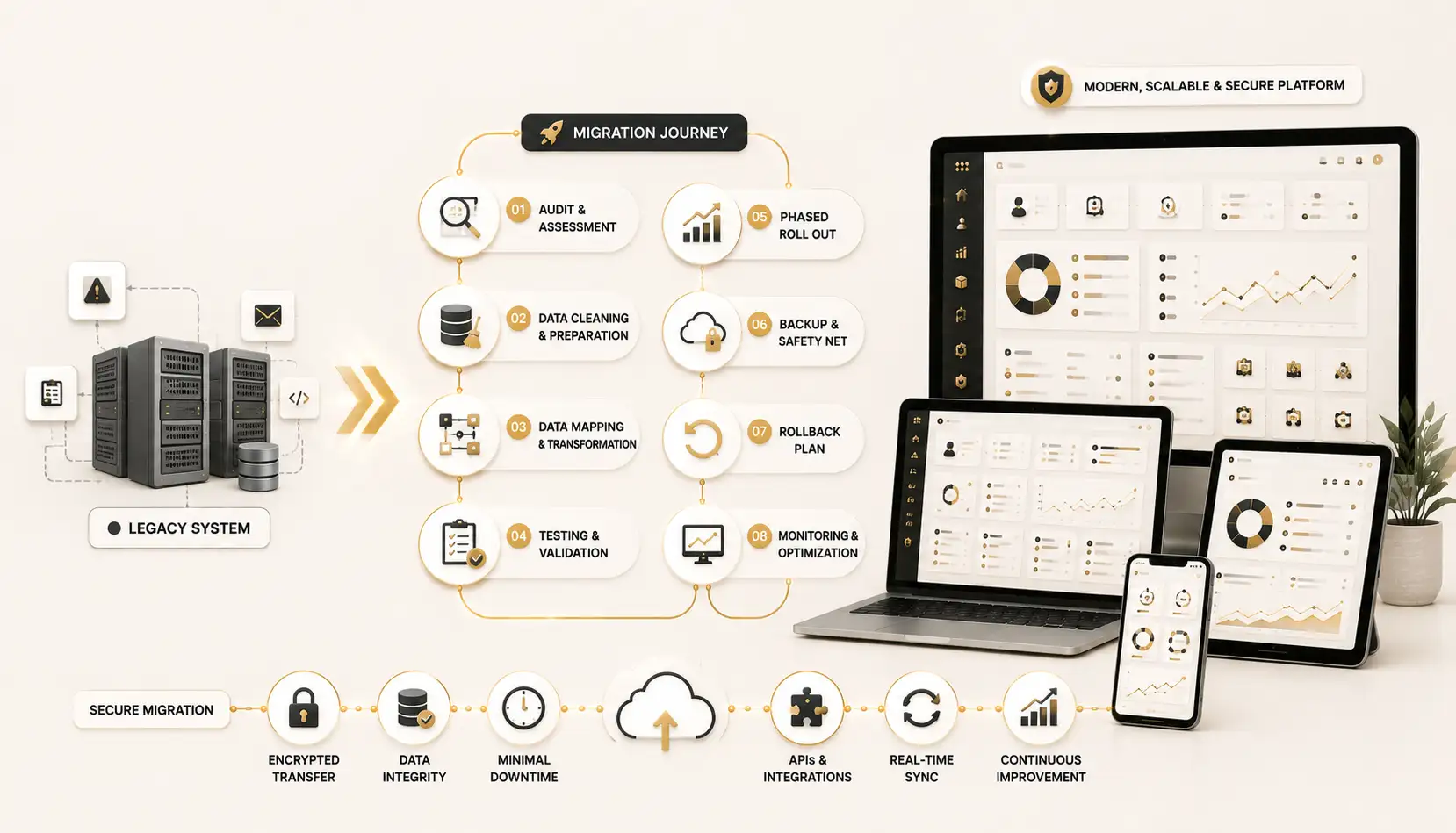
Data mapping connects fields in the old system with fields in the new system.
A “Client ID” field in the old application may correspond to a “Customer Number” field in the new platform. A single address field may need to be divided into street, city, region, and postal code.
The mapping document should explain:
- Source field
- Destination field
- Data type
- Transformation rule
- Validation requirement
- Default value
- Error-handling method
This creates a clear reference for developers, analysts, and testers.
Select a Migration Strategy
Several migration approaches are possible.
A direct cutover moves the organization from the old system to the new system at a specific time. This can be faster but carries greater risk if major issues appear.
A phased migration moves departments, locations, or modules gradually. This reduces operational risk but may require the old and new systems to operate together temporarily.
A parallel migration keeps both systems running for a defined period. This provides additional verification but creates extra work because information may need to be maintained in two places.
The right strategy depends on complexity, risk tolerance, business continuity requirements, and budget.
Test With Realistic Data
Migration testing should not be limited to a few perfect records.
The team should test:
- Large datasets
- Incomplete records
- Duplicate data
- Special characters
- Old dates
- Unusual transactions
- Linked records
- Attachments
- User permissions
- Reports
Users from different departments should verify that the migrated information is accurate and useful.
A database may technically transfer without errors while still producing incorrect business results.
Prepare Users
A new system changes how people work.
Employees may need new login procedures, screens, approval steps, reports, and responsibilities.
Training should be based on real tasks. Rather than giving users a long tour of every feature, the organization should show them how to complete their daily work.
Communication should also explain:
- Why the system is changing
- When the migration will occur
- What employees need to do
- Where support is available
- Which processes will change
Practical Example
Consider a service company replacing a 12-year-old customer management system.
The legacy application contains customer details, service history, contracts, invoices, and scanned documents. Over time, employees have created duplicate accounts and inconsistent customer names.
Instead of moving all data immediately, the company cleans active customer records first. Historical information is archived but remains searchable. The new system is introduced to one branch before being rolled out nationally.
During the pilot, users discover that contract renewal dates are displayed differently from the old system. The mapping rule is corrected before the larger rollout.
This phased approach takes more planning, but it prevents a small error from affecting the entire company.
Create a Rollback and Continuity Plan
Even well-tested migrations can encounter problems.
The organization should define:
- Backup procedures
- Rollback conditions
- Recovery responsibilities
- Communication channels
- Downtime procedures
- Manual fallback processes
- Technical support contacts
The business must know what to do if the new system cannot be used after launch.
Monitor After Go-Live
Migration does not end when the system goes live.
The team should monitor:
- Failed transactions
- Missing records
- Integration errors
- User access problems
- Performance
- Data discrepancies
- Support requests
A post-migration review can identify lessons for future technology projects.
Final Thoughts
Successful software migration requires business planning, data preparation, testing, user training, and risk management.
The technology transfer may be the most visible step, but it is only one part of the project.
Organizations replacing legacy software or developing a new platform can review the Custom Software Development service from NUR Technology Solutions:
https://nurtechnologysolutions.com/services/software-development/custom-software-development/
A good migration does more than move old information. It creates a cleaner, more reliable foundation for future operations.
---
Request Information
Interested in Software Migration?
NUR Technology Solutions
Discuss Your Technology Requirement
Explore the related service or contact our team to discuss a tailored solution for your organization.
Discuss Your Software Migration