HRIS Definition
A Human Resource Information System is a centralized software platform used to manage employee records, HR processes, workforce data and authorized HR workflows.
Connected HR Management
NUR Technology Solutions develops Human Resource Information System (HRIS) software that brings employee records, attendance, leave, payroll, recruitment, performance management and HR reporting into one connected environment. The platform can support employees, HR teams, managers, departments and multiple branches through role-based dashboards and structured workflows.
A custom HRIS that centralizes employee information, attendance, leave, payroll, recruitment, performance and HR analytics—with configurable workflows, role-based access and source-code ownership options.
HRIS Explained
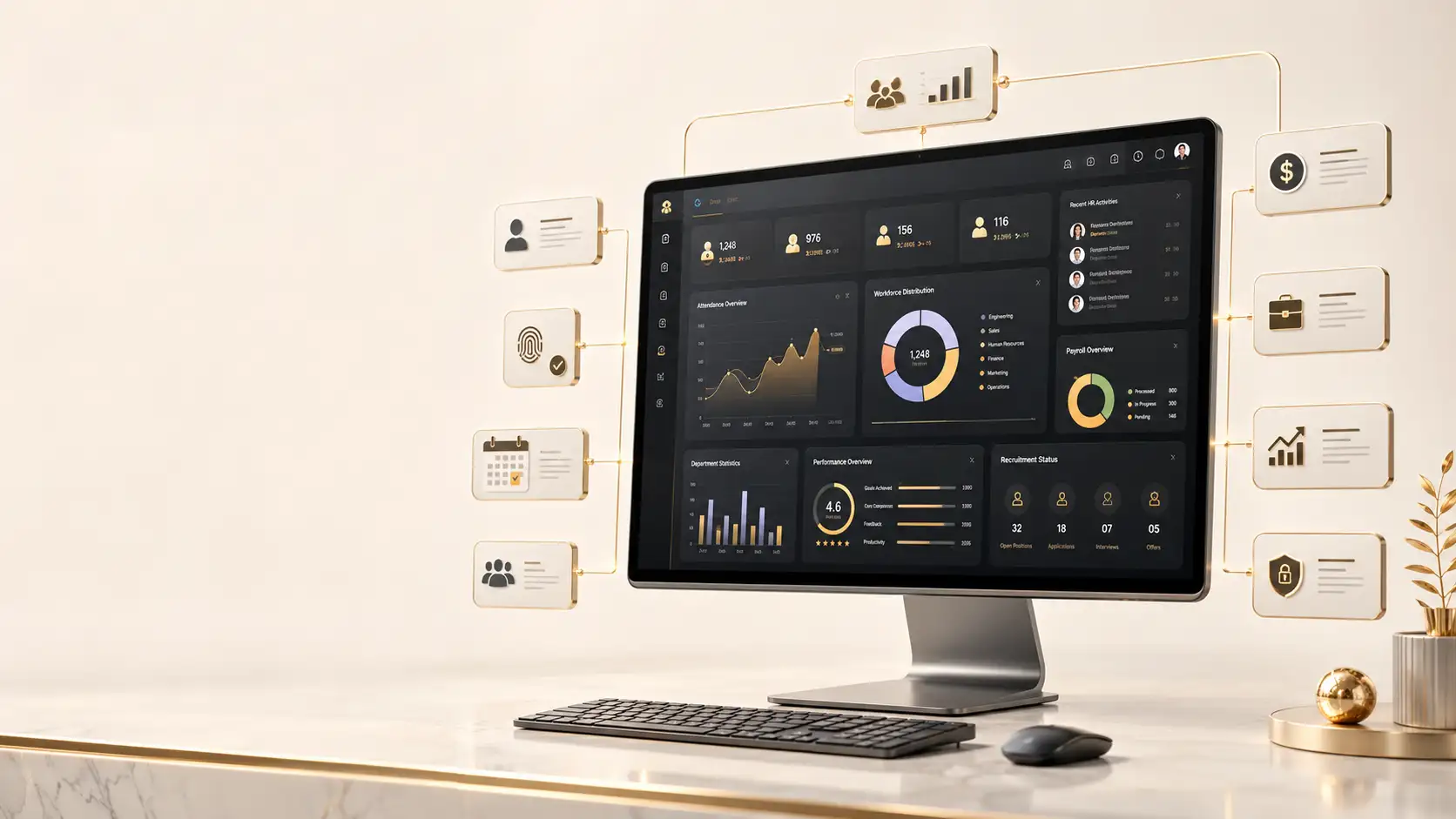
A Human Resource Information System (HRIS) is software used to store, organize and manage employee information and routine HR processes through a centralized system. Modern HRIS platforms can extend beyond employee records to support recruitment, attendance, absence management, payroll, performance management, reporting and employee self-service.
A Human Resource Information System is a centralized software platform used to manage employee records, HR processes, workforce data and authorized HR workflows.
HRIS traditionally focuses on core employee records and HR administration. HRMS commonly includes broader operational processes such as attendance, payroll and recruitment, while HCM is often used for wider talent, performance and workforce management. In practice, the terms frequently overlap.
Operational Signals
An HRIS becomes particularly useful when workforce information and HR processes are difficult to control through spreadsheets, paper forms, email chains or disconnected applications.
Connected HR Platform
NUR Technology Solutions can configure an HRIS around the organization’s workforce structure, policies and approval requirements. Core employee information can be connected with attendance, leave, payroll, recruitment, performance management and reporting so authorized users work from a more consistent information base.
Centralize approved employee profiles, employment history, documents, reporting lines and organizational structures.
Maintain attendance, shifts, working hours, late arrivals, absences, exceptions and supported device integrations.
Configure leave types, balances, requests, approvals, comments, supporting documents and team calendars.
Structure salary components, attendance-linked calculations, deductions, payroll review, payslips and payroll reports.
Organize requisitions, vacancies, candidate records, interviews, evaluations, selection stages and hiring reports.
Support goals, KPIs, appraisal cycles, ratings, manager feedback, review history and performance dashboards.
Give employees controlled access to profiles, attendance, leave, payslips, documents, notices and approved HR requests.
Provide authorized users with workforce, attendance, payroll, recruitment, performance and custom management reports.
Maintain controlled employee documents, categories, expiry dates, selected audit history and access restrictions.
Automate leave, recruitment, employee change, payroll review, performance and administrative approval workflows.
Employee Data
A centralized employee management system can maintain approved workforce records within one structured database rather than across multiple documents and spreadsheets.
Time and Attendance
The attendance management system can help HR teams maintain employee attendance records through a centralized workflow rather than relying entirely on manual registers or disconnected files.
Record present, absent, leave, holiday, late arrival, early departure and approved exceptions.
Configure office timings, shifts, working days, weekends, grace periods and approved overtime rules.
Where supported, integrate biometric devices, attendance terminals, access-control systems or approved mobile attendance applications.
Review daily and monthly attendance, late arrivals, absences, overtime and department or branch comparisons.
Leave Workflows
Replace paper applications and repeated email approvals with structured leave requests, balances, comments, supporting documents and configurable approval workflows.
Configure annual, casual, sick, parental, unpaid, compensatory and organization-specific leave categories.
Employees can select dates, choose leave types, add comments, upload supporting documents and review status.
Managers may approve, reject, return for clarification, add comments and review team calendars.
Display opening balances, allocated entitlements, used leave, pending requests and remaining balances.
Organize reports by employee, department, branch, leave type or selected time period.
Leave policies should be configured according to the organization’s approved requirements and applicable employment rules.
Payroll Operations
A payroll management system can connect approved employee, attendance and salary information to structured payroll-processing workflows while reducing repeated manual preparation.
Configure approved basic salary, allowances, bonuses, deductions, overtime, reimbursements and organization-specific components.
Support monthly processing, attendance-linked calculations, leave adjustments, deductions, approved incentives, review and finalization.
Provide controlled access to downloadable payslips through an employee self-service portal.
Configure tax, deductions and statutory components according to the organization’s jurisdiction and approved payroll policies.
Generate payroll summaries, department and branch reports, salary-component reports and deduction reports for authorized users.
Employee Access
An employee self-service portal can allow staff to access selected HR information and complete approved routine requests without depending on HR for every transaction.
View profile information, attendance, leave balances, pending requests, notices, documents and assigned tasks.
Submit and track approved leave workflows through a responsive portal.
Access approved payslips, HR letters, policies, forms and employment documents.
Request updates to selected personal information according to approval rules.
Submit configured requests for certificates, letters, benefits, administration and other HR services.
Talent Acquisition
A recruitment management system can organize hiring activity from vacancy creation through applicant review and onboarding preparation.
Departments may submit recruitment requests through configured approval workflows.
Define job title, department, location, requirements, employment type and opening or closing dates.
Maintain candidate details, CVs, applications, notes, interview status and evaluations.
Support interview scheduling, interviewer assignment, evaluation forms, comments and status updates.
Move candidates through configured stages such as applied, shortlisted, interviewed, selected, offered or hired.
Review open positions, candidate pipelines, department requirements and hiring stages.
Employee Lifecycle
Coordinate employee record creation, document collection, policy acknowledgement, department allocation, manager assignment, onboarding tasks and asset requests.
Structure resignation records, approvals, clearance, asset return, final documentation, access-removal tasks and exit information.
Create structured checklists so relevant departments can complete assigned responsibilities consistently.
Performance
A performance management system can provide a structured framework for setting expectations, reviewing progress and maintaining authorized performance records.
Define individual and team goals, performance periods, target dates and measurable indicators.
Support employee assessments, manager assessments, review cycles, ratings, comments and recommendations.
Configure KPIs according to department and role requirements.
Provide authorized access to historical performance records for approved purposes.
Review completed and pending evaluations, goal progress and selected department-level indicators.
The system structures the organization’s approved evaluation methodology; it does not independently determine employee performance.
Management Visibility
A centralized HR database can support role-based reports and dashboards for HR teams and authorized management users.
Review total employees, attendance, leave, departments, branches, new hires and employee status.
Review attendance patterns, absences, late arrivals, leave usage and department summaries.
Review approved payroll totals and salary components.
Monitor vacancies, candidate pipelines and hiring stages.
Review approved goal, appraisal and performance information.
Configure reports by branch, department, designation, employee category, location or time period.
Export approved information in supported formats according to permissions.
Workflow Automation
Structure routine HR processes using configurable workflows rather than repeated emails and informal approvals.
Route requests through assigned managers and configured approval levels.
Manage requisitions, vacancy approvals and selected hiring stages.
Structure approved profile, designation, department or employment changes.
Configure payroll review steps before finalization.
Coordinate review cycles, manager evaluations and approvals.
Route configured employee requests to responsible teams.
Define request recipients, approval levels, reminders and escalation rules.
Access Control
Users can be given access according to their responsibilities, assigned teams, branches and approved data permissions.
Access approved employee records, attendance, leave, payroll, recruitment, performance, reports and configurations.
Review team information, pending approvals, attendance summaries, leave requests and performance reviews.
Access approved personal records and self-service functions.
Provide consolidated workforce summaries and selected reports to authorized executives.
Restrict managers to assigned branches, departments, teams or locations.
Records and Documents
Maintain approved files within structured employee profiles.
Organize employment, identification, education, training, appraisal, payroll and administrative records.
Track expiry dates for selected documents where appropriate.
Restrict sensitive documents according to role and organizational policy.
Record selected upload, update or access events where required.
Enterprise Structure
NUR Technology Solutions can design HRIS architecture for organizations operating through multiple companies, branches, offices, factories, campuses or service locations.
Separate approved records and settings by company.
Assign employees to branches, regions, offices, campuses, factories or warehouses.
Maintain organization-specific department hierarchies.
Configure selected leave, attendance or payroll rules by company or location where required.
Provide authorized management with consolidated information across selected entities.
Business Integration
The HRIS can be integrated with approved existing systems where suitable technical methods are available.
Exchange approved payroll or finance data through supported interfaces.
Connect selected employee, cost-centre, organizational or workflow data.
Connect supported biometric devices, terminals or attendance platforms.
Transfer approved payroll or accounting information where supported.
Integrate approved identity, directory or single-sign-on systems where technically feasible.
Send configured notifications through approved communication providers.
Connect selected document repositories or storage systems where supported.
Provide approved data to reporting and analytics environments.
Connect supported external services through documented and permitted interfaces.
Integration feasibility depends on available APIs, technical documentation, licensing conditions, access permissions and the architecture of the connected system.
Security Planning
Human-resource systems contain sensitive employee and payroll information, so access, hosting and security requirements should be addressed during system planning.
Configure approved authentication controls for system users.
Restrict access according to responsibilities and authorized data scope.
Limit selected users to assigned organizational units.
Restrict payroll information to specifically authorized roles.
Record selected administrative and workflow events where required.
Apply appropriate controls to approved system integrations.
Define backup responsibilities according to hosting architecture.
Plan restoration procedures and business-continuity responsibilities.
Configure system settings and access according to approved governance requirements.
Security controls are configured according to the organization’s users, data sensitivity, hosting environment, integration requirements and applicable policies.
Ownership and Control
Organizations may require greater control over the HR system that manages their workforce information. Ownership arrangements can be structured according to the approved project contract.
The agreed custom-developed source code may be provided to the client according to contractual terms.
The organization may retain control over its HR database according to the selected architecture and hosting arrangement.
Relevant deployment documentation may be provided according to project scope.
Ownership arrangements may provide greater flexibility to expand or maintain the system in the future.
Custom code, open-source software, licensed libraries, external services and third-party APIs remain subject to their applicable terms.
Source-code and database ownership are provided according to the agreed contract, project scope and applicable third-party licensing terms.
Deployment Options
Deployment can be planned according to organizational requirements, user count, IT environment, security policies and business-continuity requirements.
Deploy in an approved cloud environment according to performance and security requirements.
Deploy within infrastructure controlled by the client where suitable.
Use private environments where required by organizational architecture.
Consider on-premise deployment where technically appropriate.
Separate environments may be configured according to project scope.
Define responsibilities for monitoring, backups and recovery before deployment.
Implementation
Review employee lifecycle, attendance, leave, payroll, recruitment, performance, branches, approvals and reports.
Translate approved HR policies into modules, forms, workflows, permissions, reports and business rules.
Define database, roles, modules, hosting, integrations and security requirements.
Design dashboards for employees, HR teams, managers and senior management.
Build approved HR modules and workflows.
Connect approved payroll, attendance, ERP or other business systems where technically feasible.
Test workflows, permissions, calculations, reports, integrations and responsive interfaces.
Migrate accessible records from spreadsheets, databases or legacy HR systems subject to data quality and structure.
Deploy into the agreed environment and train relevant administrators and users according to scope.
Provide ongoing support or additional modules under an agreed service arrangement.
Business Value
Bring approved workforce information into one structured system.
Structured workflows can reduce repeated spreadsheet and email-based processes.
Apply defined attendance, leave, recruitment and approval workflows more consistently.
Give authorized employees, managers and HR teams access to relevant information without separate files.
Provide management with structured workforce reports.
Give employees controlled access to routine HR information and requests.
Apply centralized oversight while maintaining branch-level access.
Connect HR workflows with approved enterprise systems where technically feasible.
Modify modules, reports and workflows as organizational requirements evolve.
Structure ownership arrangements according to project scope and applicable licensing terms.
Industry Applications
Support factories, departments, multiple shifts, attendance, payroll and workforce records.
Support field teams, warehouses, regional branches and employee administration.
Manage employees across branches, stores and management regions.
Support schools, colleges, universities and vocational institutions with faculty and administrative employee records.
Support departments, shifts, employee records and authorized workforce administration.
Manage teams, recruitment, leave, performance and organizational structures.
Support employees, departments, approvals and reporting.
Manage multiple locations, shifts, attendance and employee records.
Centralize HR administration across offices, branches or regional operations.
Why NUR Technology Solutions
Configure the platform around approved organizational processes rather than one fixed structure.
Support may extend from recruitment and onboarding to payroll, performance and separation.
Connect employee records, attendance, leave, payroll, recruitment and reporting through one environment.
Configure access for different companies, branches and departments.
Provide employees, managers and HR teams with interfaces suited to their responsibilities.
Develop approved workforce reports around management requirements.
Connect existing business platforms where technically feasible.
Structure ownership according to the agreed contract and applicable licensing terms.
NUR Technology Solutions is based in Lahore, Pakistan, and can support organizations operating locally and internationally.
Frequently Asked Questions
A Human Resource Information System, or HRIS, is software used to centralize employee data and manage approved HR processes such as attendance, leave, payroll, recruitment, performance management and reporting.
The terms often overlap. HRIS traditionally focuses on employee records and core HR administration. HRMS generally adds functions such as payroll, attendance and recruitment, while HCM commonly describes broader talent, performance and workforce-management capabilities. Modern platforms frequently combine features from all three categories.
Yes. The system can include attendance records, shifts, late arrivals, absences, overtime information and related reports. Integration with biometric or attendance devices depends on supported APIs or technical connection methods.
Yes. Employees can submit leave requests through a self-service portal, view available balances and track approval status according to configured policies and workflows.
Yes. Managers may receive leave requests according to the organizational reporting structure and approve, reject or return them for clarification.
Payroll functionality can be included. It may support salary structures, approved allowances, deductions, attendance-linked calculations, payslips and payroll reports. Exact rules depend on organizational and jurisdictional requirements.
Yes. Recruitment functionality may include job requisitions, vacancies, candidate records, CVs, interviews, evaluations, selection stages and hiring reports.
Yes. Performance modules may support goals, KPIs, appraisal cycles, ratings, manager feedback and approved performance reports. The system structures the company’s evaluation process rather than independently judging employee performance.
Yes. Employees may be given access to their profiles, attendance, leave, payslips, documents, notices and approved HR requests according to role permissions.
Yes. A custom HRIS can support multiple companies, branches, factories, offices, campuses or departments with localized permissions and centralized management reporting.
Yes. Role-based permissions can restrict managers to assigned employees, departments, branches or teams.
Potentially. Integration depends on the device model, available APIs or data-export methods, technical documentation and access permissions.
Integration may be possible through APIs, secure data exchange or other supported methods. Feasibility depends on the architecture and integration capabilities of the connected systems.
Existing data may be migrated from spreadsheets, databases or legacy systems where it is accessible and suitable for transfer. Migration effort depends on data quality, format, completeness and structure.
Yes. Employee-related documents can be maintained according to approved access controls, categories, storage limits and organizational policies.
A responsive HRIS can be designed for desktop, tablet and mobile access. A separate mobile app may also be considered where the organization requires additional mobile-specific features.
Yes. Authorized users may receive dashboards and reports covering employee records, attendance, leave, payroll, recruitment and performance. Report timing depends on the availability and synchronization of source data.
Client-controlled hosting or on-premise deployment may be considered where technically suitable. Infrastructure, backups, monitoring and support responsibilities should be agreed before implementation.
Source-code and database ownership may be provided according to the agreed contract, project scope and applicable third-party licensing terms.
A custom architecture can be planned to support additional modules, branches, users, workflows, integrations and reports. Each future enhancement should be reviewed for compatibility with the existing implementation.
Modernize HR Operations
Move beyond disconnected spreadsheets, paper forms and repetitive HR administration with a Human Resource Information System built around your organization’s employees, policies, branches and workflows.
Discuss your attendance, leave, payroll, recruitment, performance, reporting, integration and deployment requirements with NUR Technology Solutions.
Request an HRIS Consultation